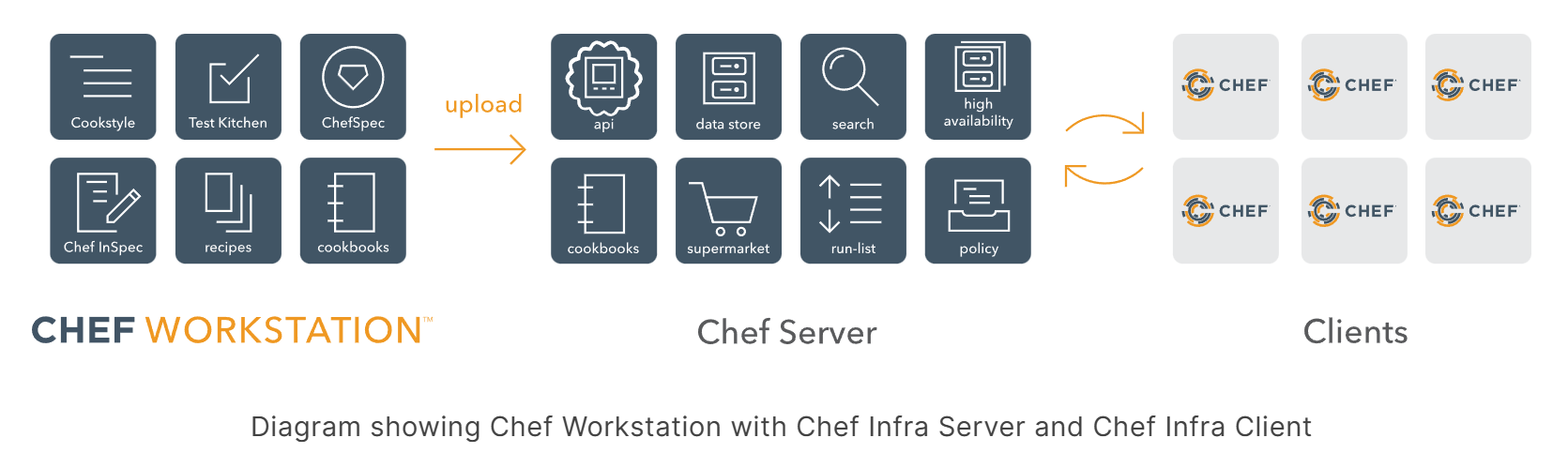
Chef is a powerful automation platform that transforms infrastructure into code, enabling automated configuration, deployment, and management of servers at scale.
Chef 是一个基于 Ruby 的自动化配置管理工具,通过将基础设施定义为代码(Infrastructure as Code),实现服务器配置的自动化管理和部署。
Chef Infra 是 Chef 的核心组件,负责配置管理的实际执行。它包含:
Chef Infra Client : 运行在被管理节点上的代理程序,负责执行配置代码(Recipes 和 Cookbooks)Chef Infra Server : 中央存储和分发配置数据的服务器,存储 Cookbooks、Policies、节点信息等Ohai : 系统信息收集工具,自动检测节点的硬件、网络、操作系统等信息
核心特性:
声明式配置:描述期望状态而非执行步骤
幂等性:多次执行相同配置产生相同结果
跨平台支持:Linux、Windows、macOS 等
Chef Workstation 是开发和管理 Chef 代码的本地环境,包含:
Chef CLI : 命令行工具集(knife、chef、cookstyle 等)Test Kitchen : 本地测试框架,用于在虚拟环境中测试 CookbooksInSpec : 合规性和安全性测试工具Cookstyle : Ruby 代码风格检查工具
主要功能:
编写和测试 Cookbooks
管理 Chef Server 上的对象(节点、角色、环境等)
上传 Cookbooks 到 Chef Server
引导(Bootstrap)新节点
Chef Server 是中央化的配置管理服务器,提供:
Cookbook 存储 : 存储和版本管理所有 Cookbooks节点对象 : 维护每个节点的状态和属性搜索索引 : 支持通过属性搜索节点策略管理 : 定义不同环境的配置策略权限控制 : 基于角色的访问控制(RBAC)
工作流程:
开发者在 Workstation 编写 Cookbooks
使用 knife 上传 Cookbooks 到 Server
Client 从 Server 拉取配置并执行
Client 报告执行结果回 Server
Chef Client 是运行在被管理节点上的代理程序:
定期执行 : 默认每 30 分钟运行一次(可配置)拉取模式 : 主动从 Server 拉取最新配置本地执行 : 下载 Cookbooks 到本地缓存后执行状态报告 : 执行完成后向 Server 报告节点状态
执行流程:
运行 Ohai 收集节点信息
从 Chef Server 同步 Cookbooks
加载节点的 run_list
编译资源集合(Resource Collection)
按顺序执行资源
报告执行结果
模式
说明
适用场景
Client-Server 中央化管理,Client 从 Server 拉取配置
大规模生产环境
Chef Solo 无需 Server,本地执行 Cookbooks
小规模部署、测试环境
Chef Zero 轻量级内存 Server,用于开发测试
本地开发和 CI/CD
1
2
3
4
5
6
7
8
9
10
11
12
13
14
15
16
17
18
19
20
21
22
23
24
mycookbook/ ├── attributes/ # 属性定义 │ └── default.rb ├── recipes/ # 配置代码 │ ├── default.rb │ └── webserver.rb ├── templates/ # 动态配置文件模板 │ └── default/ │ └── nginx.conf.erb ├── files/ # 静态文件 │ └── default/ │ └── index.html ├── libraries/ # 自定义 Ruby 库 │ └── helpers.rb ├── resources/ # 自定义资源 │ └── myapp.rb ├── test/ # 测试代码 │ └── integration/ │ └── default/ │ └── default_test.rb ├── Berksfile # Berkshelf 依赖管理 ├── kitchen.yml # Test Kitchen 配置 ├── metadata.rb # Cookbook 元数据 └── README.md
文件说明: metadata.rb 定义 Cookbook 的基本信息、版本、依赖关系和支持的平台。这是每个 Cookbook 必需的文件。
示例:
1 2 3 4 5 6 7 8 9 10 11 12 13 14 15 16 17 18 19 20 21 22 23 24 25 26 27 28 29 30 31 name 'mycookbook' maintainer 'Your Name' maintainer_email 'you@example.com' license 'Apache-2.0' description 'Installs and configures my application' version '1.2.3' chef_version '>= 16.0' depends 'nginx' , '~> 10.0' depends 'mysql' , '>= 8.0' depends 'apt' , '~> 7.4' supports 'ubuntu' , '>= 18.04' supports 'centos' , '>= 7.0' supports 'debian' , '>= 10' provides 'mycookbook::default' provides 'mycookbook::webserver' source_url 'https://github.com/yourorg/mycookbook' issues_url 'https://github.com/yourorg/mycookbook/issues' privacy true
关键字段说明:
name: Cookbook 名称(必需)version: 版本号,遵循语义化版本(必需)depends: 声明依赖的 Cookbook 及版本约束chef_version: 要求的 Chef Infra Client 版本supports: 声明支持的操作系统和版本provides: 显式声明提供的 Recipes
版本约束语法:
1
2
3
4
5
depends 'nginx' depends 'nginx' , '= 10.0.0' depends 'nginx' , '>= 10.0' depends 'nginx' , '~> 10.0' depends 'nginx' , '>= 10.0' , '< 12.0'
文件说明: Berksfile 用于管理 Cookbook 依赖,类似于 Ruby 的 Gemfile 或 Node.js 的 package.json。Berkshelf 是 Chef 的依赖管理工具。
示例:
1 2 3 4 5 6 7 8 9 10 11 12 13 14 15 16 17 18 19 20 21 22 23 24 25 source 'https://supermarket.chef.io' metadata cookbook 'build-essential' , '~> 8.2' cookbook 'custom-nginx' , git: 'https://github.com/yourorg/custom-nginx.git' , branch: 'master' cookbook 'internal-tools' , path: '../internal-tools' cookbook 'java' , '~> 8.5.0' group :integration do cookbook 'test-helper' end
常用 Berkshelf 命令:
1 2 3 4 5 6 7 8 9 10 11 12 13 14 15 16 17 berks install berks update berks upload berks list berks package cookbooks.tar.gz berks apply
Berksfile.lock:
1 2 3 4 5 6 7 8 9 10 11 12 13 DEPENDENCIES mycookbook path: . metadata: true nginx (~> 10.0 ) GRAPH mycookbook (1.2 .3 ) nginx (~> 10.0 ) nginx (10.1 .0 ) apt (>= 7.0 ) apt (7.4 .0 )
文件说明:
属性优先级(从低到高):
default - 默认值force_default - 强制默认值normal - 普通属性(持久化到节点对象)override - 覆盖属性force_override - 强制覆盖automatic - 自动属性(由 Ohai 收集,最高优先级)
示例:
1 2 3 4 5 6 7 8 9 10 11 12 13 14 15 16 17 18 19 20 21 22 23 24 25 26 27 28 29 30 31 32 33 34 35 36 37 38 39 40 41 42 43 44 45 46 47 48 49 50 51 default['mycookbook' ]['version' ] = '1.0.0' default['mycookbook' ]['user' ] = 'appuser' default['mycookbook' ]['group' ] = 'appgroup' default['mycookbook' ]['config' ]['port' ] = 8080 default['mycookbook' ]['config' ]['host' ] = '0.0.0.0' default['mycookbook' ]['config' ]['workers' ] = 4 default['mycookbook' ]['packages' ] = %w(git curl vim) default['mycookbook' ]['allowed_ips' ] = ['10.0.0.0/8' , '192.168.0.0/16' ] default['mycookbook' ]['database' ] = { 'host' => 'localhost' , 'port' => 3306 , 'name' => 'myapp' , 'user' => 'dbuser' , 'password' => 'secret' } case node['platform' ]when 'ubuntu' , 'debian' default['mycookbook' ]['package_name' ] = 'myapp' default['mycookbook' ]['service_name' ] = 'myapp' when 'centos' , 'redhat' default['mycookbook' ]['package_name' ] = 'myapp-el' default['mycookbook' ]['service_name' ] = 'myapp-service' end if node['platform_version' ].to_f >= 20.04 default['mycookbook' ]['use_systemd' ] = true else default['mycookbook' ]['use_systemd' ] = false end default['mycookbook' ]['install_dir' ] = "/opt/#{node['mycookbook' ]['version' ]} " default['mycookbook' ]['config_file' ] = "#{node['mycookbook' ]['install_dir' ]} /config.yml" normal['mycookbook' ]['node_id' ] = SecureRandom .uuid override['mycookbook' ]['debug' ] = true if node.chef_environment == 'development'
在 Recipe 中使用属性:
1 2 3 4 5 6 7 8 9 10 11 12 13 14 15 16 17 18 19 20 21 22 23 24 25 26 27 28 29 30 31 32 33 34 35 36 37 38 39 40 41 42 43 44 app_user = node['mycookbook' ]['user' ] app_port = node['mycookbook' ]['config' ]['port' ] user app_user do system true shell '/bin/false' home '/opt/myapp' end directory '/opt/myapp' do owner app_user group node['mycookbook' ]['group' ] mode '0755' action :create end node['mycookbook' ]['packages' ].each do |pkg | package pkg do action :install end end template '/etc/myapp/database.yml' do source 'database.yml.erb' variables( database: node['mycookbook' ]['database' ] ) mode '0600' end node.default['mycookbook' ]['runtime_value' ] = 'computed' file node['mycookbook' ]['config_file' ] do content "port: #{node['mycookbook' ]['config' ]['port' ]} " action :create end
属性文件组织:
1 2 3 4 5 6 7 8 9 10 default['mycookbook' ]['version' ] = '1.0.0' default['mycookbook' ]['database' ]['host' ] = 'localhost' default['mycookbook' ]['database' ]['port' ] = 3306 default['mycookbook' ]['web' ]['port' ] = 80 default['mycookbook' ]['web' ]['ssl_port' ] = 443
通过 Roles 覆盖属性:
1 2 3 4 5 6 7 8 9 10 11 12 13 14 15 16 17 18 19 20 21 22 23 24 name 'webserver' description 'Web server role' default_attributes( 'mycookbook' => { 'config' => { 'port' => 80 } } ) override_attributes( 'mycookbook' => { 'config' => { 'workers' => 8 } } ) run_list( 'recipe[mycookbook::default]' , 'recipe[nginx::default]' )
通过 Environments 覆盖属性:
1 2 3 4 5 6 7 8 9 10 11 12 13 14 15 16 17 name 'production' description 'Production environment' default_attributes( 'mycookbook' => { 'database' => { 'host' => 'db.prod.example.com' } } ) override_attributes( 'mycookbook' => { 'debug' => false } )
在 kitchen.yml 中覆盖属性:
1
2
3
4
5
6
7
suites: - name: default attributes: mycookbook: config: port: 9090 debug: true
文件说明: .kitchen.yml 是 Test Kitchen 的配置文件,定义测试环境、平台和测试套件。
完整示例:
1
2
3
4
5
6
7
8
9
10
11
12
13
14
15
16
17
18
19
20
21
22
23
24
25
26
27
28
29
30
31
32
33
34
35
36
37
38
39
40
41
42
43
44
45
46
47
48
49
50
51
52
53
54
55
56
57
58
59
60
61
62
63
64
65
66
67
68
69
70
71
72
73
74
75
76
77
78
79
80
81
82
83
84
85
86
87
88
89
90
91
92
93
94
95
96
97
98
99
100
101
102
103
104
105
106
107
108
109
110
111
112
113
114
--- driver: name: vagrant provider: virtualbox customize: memory: 2048 cpus: 2 provisioner: name: chef_zero product_name: chef product_version: 18 channel: stable log_level: info client_rb: chef_license: accept data_bags_path: test/fixtures/data_bags roles_path: test/fixtures/roles environments_path: test/fixtures/environments verifier: name: inspec reporter: - cli - json:reports/%{platform}_%{suite}_inspec.json transport: name: ssh max_ssh_sessions: 2 platforms: - name: ubuntu-20.04 driver: box: bento/ubuntu-20.04 provisioner: product_version: 18.1 .0 - name: ubuntu-22.04 driver: box: bento/ubuntu-22.04 - name: centos-8 driver: box: bento/centos-8 provisioner: chef_omnibus_install_options: -d /tmp - name: debian-11 driver: box: bento/debian-11 suites: - name: default run_list: - recipe[mycookbook::default] verifier: inspec_tests: - test/integration/default attributes: mycookbook: version: '1.0.0' config: port: 8080 - name: webserver run_list: - recipe[mycookbook::webserver] - recipe[nginx::default] verifier: inspec_tests: - test/integration/webserver attributes: nginx: default_site_enabled: true mycookbook: web: port: 80 includes: - ubuntu-20.04 - debian-11 - name: database run_list: - recipe[mycookbook::database] attributes: mycookbook: database: host: localhost port: 3306 excludes: - centos-8 lifecycle: pre_create: echo "Before creating instance" post_create: echo "After creating instance" pre_converge: echo "Before converging" post_converge: echo "After converging"
简化配置示例:
1
2
3
4
5
6
7
8
9
10
11
12
13
14
15
16
17
18
19
20
21
22
23
24
25
--- driver: name: vagrant provisioner: name: chef_zero product_version: 18 verifier: name: inspec platforms: - name: ubuntu-20.04 - name: centos-8 suites: - name: default run_list: - recipe[mycookbook::default] verifier: inspec_tests: - test/integration/default attributes: mycookbook: debug: true
使用 Docker 驱动:
1
2
3
4
5
6
7
8
9
10
11
12
13
14
15
16
17
18
19
20
--- driver: name: docker use_sudo: false privileged: true platforms: - name: ubuntu-20.04 driver_config: image: ubuntu:20.04 platform: ubuntu - name: centos-8 driver_config: image: centos:8 platform: centos suites: - name: default run_list: - recipe[mycookbook::default]
多套件配置:
1
2
3
4
5
6
7
8
9
10
11
12
13
14
15
16
17
18
19
20
21
22
23
24
25
suites: - name: default run_list: - recipe[mycookbook::default] attributes: mycookbook: mode: standard - name: minimal run_list: - recipe[mycookbook::minimal] attributes: mycookbook: mode: minimal packages: [] - name: full run_list: - recipe[mycookbook::default] - recipe[mycookbook::webserver] - recipe[mycookbook::database] attributes: mycookbook: mode: full install_all: true
资源说明: package 资源用于管理系统软件包的安装、升级和卸载。它是一个通用资源,会根据系统平台自动选择合适的包管理器(apt、yum、dnf、zypper 等)。
平台特定的包管理器资源:
资源类型
包管理器
平台
使用场景
package自动检测
跨平台
通用场景,推荐使用
yum_packageYUM
RHEL/CentOS 6-7
需要 YUM 特定功能(如 flush_cache)
dnf_packageDNF
RHEL/CentOS 8+, Fedora
需要 DNF 特定功能
apt_packageAPT
Debian/Ubuntu
需要 APT 特定功能(如 default_release)
rpm_packageRPM
RHEL 系
安装本地 .rpm 文件
dpkg_packageDPKG
Debian 系
安装本地 .deb 文件
语法:
1
2
3
4
5
6
7
8
package 'name' do package_name String , Array version String options String , Array source String timeout Integer action Symbol end
属性说明:
package_name: 要管理的包名,可以是字符串或数组(安装多个包)version: 指定要安装的版本,留空则安装最新版options: 传递给底层包管理器的参数(如 --no-install-recommends)source: 本地包文件路径(用于安装 .rpm 或 .deb 文件)timeout: 包安装超时时间,默认 900 秒
Actions:
:install - 安装包(默认):upgrade - 升级到最新或指定版本:remove - 卸载包但保留配置文件:purge - 完全卸载包和配置文件:reconfig - 重新配置已安装的包
示例:
1 2 3 4 5 6 7 8 9 10 11 12 13 14 15 16 17 18 19 20 21 22 23 24 25 26 27 28 29 30 31 32 33 34 35 36 37 38 39 40 41 42 43 44 45 package 'nginx' package 'nginx' do version '1.18.0-1ubuntu1' action :install end package %w(git curl vim wget) yum_package 'httpd' do flush_cache [:before ] action :install end rpm_package 'custom-app' do source '/tmp/custom-app-1.0.0.rpm' action :install end dnf_package 'postgresql' do version '12.5' action :install end apt_package 'nginx' do default_release 'buster-backports' action :install end package 'apache2' do only_if { node['platform_family' ] == 'debian' } end package 'nginx' do notifies :restart , 'service[nginx]' , :delayed end
资源说明: service 资源用于管理系统服务的启动、停止、重启和开机自启动。支持多种服务管理系统(systemd、upstart、sysvinit 等)。
语法:
1
2
3
4
5
6
7
8
9
10
11
12
service 'name' do service_name String pattern String start_command String stop_command String restart_command String reload_command String status_command String supports Hash timeout Integer action Symbol end
属性说明:
service_name: 实际的服务名称,用于与服务管理系统交互pattern: 用于 ps 命令搜索进程的正则表达式start_command: 覆盖默认的启动命令stop_command: 覆盖默认的停止命令restart_command: 覆盖默认的重启命令reload_command: 覆盖默认的重载命令status_command: 覆盖默认的状态检查命令supports: 声明服务支持的操作,如 { status: true, restart: true, reload: true }timeout: 服务操作的超时时间
Actions:
:start - 启动服务:stop - 停止服务:restart - 重启服务:reload - 重新加载配置(不停止服务):enable - 设置开机自启动:disable - 禁用开机自启动:nothing - 什么都不做(默认)
示例:
1 2 3 4 5 6 7 8 9 10 11 12 13 14 15 16 17 18 19 20 21 22 23 24 25 26 27 service 'nginx' do action [:enable , :start ] end service 'nginx' do service_name 'nginx' supports status: true , restart: true , reload: true action [:enable , :start ] subscribes :reload , 'template[/etc/nginx/nginx.conf]' , :delayed end service 'myapp' do start_command '/opt/myapp/bin/start.sh' stop_command '/opt/myapp/bin/stop.sh' status_command '/opt/myapp/bin/status.sh' pattern 'myapp' action [:enable , :start ] end service 'apache2' do action :restart only_if { : :File .exist?('/etc/apache2/apache2.conf' ) } end
资源说明: systemd_unit 资源用于创建、管理和控制 systemd 单元文件(service、socket、device、mount、automount、swap、target、path、timer、slice、scope)。相比 service 资源,它提供了对 systemd 特定功能的完整控制。
语法:
1
2
3
4
5
6
7
8
systemd_unit 'name' do content String , Hash unit_name String user String triggers_reload true , false verify true , false action Symbol end
属性说明:
content: 单元文件的内容,可以是字符串或 Hash(会自动转换为 INI 格式)unit_name: systemd 单元的名称,包含类型后缀(如 myapp.service)user: 指定用户名,创建用户级单元文件(位于 ~/.config/systemd/user/)triggers_reload: 单元文件变化时是否自动执行 systemctl daemon-reloadverify: 是否使用 systemd-analyze verify 验证单元文件语法
Actions:
:create - 创建单元文件:delete - 删除单元文件:preset - 根据预设策略启用/禁用单元:revert - 恢复到包管理器提供的版本:enable - 设置开机启动:disable - 禁用开机启动:mask - 屏蔽单元(完全禁止启动):unmask - 取消屏蔽:start - 启动单元:stop - 停止单元:restart - 重启单元:reload - 重新加载单元配置:reload_or_restart - 尝试重载,失败则重启:nothing - 什么都不做(默认)
示例:
1 2 3 4 5 6 7 8 9 10 11 12 13 14 15 16 17 18 19 20 21 22 23 24 25 26 27 28 29 30 31 32 33 34 35 36 37 38 39 40 41 42 43 44 45 46 47 48 49 50 51 52 53 54 55 56 57 58 59 60 61 62 63 64 65 66 67 68 69 70 71 72 73 74 75 76 77 78 79 80 81 82 83 84 85 86 87 88 89 90 91 92 93 94 95 96 97 98 systemd_unit 'myapp.service' do content({ Unit : { Description : 'My Application Service' , After : 'network.target' }, Service : { Type : 'simple' , User : 'appuser' , WorkingDirectory : '/opt/myapp' , ExecStart : '/opt/myapp/bin/start.sh' , ExecStop : '/opt/myapp/bin/stop.sh' , Restart : 'on-failure' , RestartSec : '10s' }, Install : { WantedBy : 'multi-user.target' } }) action [:create , :enable , :start ] end systemd_unit 'custom-app.service' do content <<~UNIT [Unit] Description=Custom Application After=network.target [Service] Type=forking ExecStart=/usr/bin/custom-app --daemon PIDFile=/var/run/custom-app.pid [Install] WantedBy=multi-user.target UNIT action [:create , :enable , :start ] end systemd_unit 'backup.timer' do content({ Unit : { Description : 'Daily Backup Timer' }, Timer : { OnCalendar : 'daily' , Persistent : true }, Install : { WantedBy : 'timers.target' } }) action [:create , :enable , :start ] end systemd_unit 'backup.service' do content({ Unit : { Description : 'Backup Service' }, Service : { Type : 'oneshot' , ExecStart : '/usr/local/bin/backup.sh' } }) action :create end systemd_unit 'user-app.service' do user 'john' content({ Unit : { Description : 'User Application' }, Service : { ExecStart : '/home/john/bin/app' }, Install : { WantedBy : 'default.target' } }) action [:create , :enable , :start ] end systemd_unit 'unwanted.service' do action :mask end systemd_unit 'old-service.service' do action [:stop , :disable , :delete ] end
资源说明: file 资源用于管理文件的创建、删除和属性修改(权限、所有者等)。可以设置文件内容,但不支持模板变量(使用 template 资源处理模板)。
语法:
1
2
3
4
5
6
7
8
9
10
11
12
13
file 'name' do path String content String owner String , Integer group String , Integer mode String , Integer backup Integer , false checksum String force_unlink true , false manage_symlink_source true , false verify String , Block action Symbol end
属性说明:
path: 文件的完整路径content: 文件的文本内容,可以使用 lazy 延迟求值owner: 文件所有者(用户名或 UID)group: 文件所属组(组名或 GID)mode: 文件权限,如 '0644' 或 0644backup: 修改文件前保留的备份数量,设为 false 禁用备份checksum: 用于验证文件内容的 SHA-256 校验和verify: 验证文件内容的命令(如 'nginx -t -c %{file}')
Actions:
:create - 创建文件(默认):delete - 删除文件:touch - 更新文件访问和修改时间:create_if_missing - 仅当文件不存在时创建:nothing - 什么都不做
示例:
1 2 3 4 5 6 7 8 9 10 11 12 13 14 15 16 17 18 19 20 21 22 23 24 25 26 27 28 29 30 31 32 33 34 35 36 37 38 39 40 41 42 43 44 45 46 47 48 file '/etc/motd' do content 'Welcome to my server!' mode '0644' owner 'root' group 'root' action :create end file '/etc/app/config.txt' do content lazy { "Hostname: #{node['hostname' ]} \n" \ "IP: #{node['ipaddress' ]} \n" \ "Generated at: #{Time .now} " } mode '0644' action :create end file '/tmp/oldfile' do action :delete only_if { : :File .exist?('/tmp/oldfile' ) } end file '/var/log/app.log' do mode '0644' owner 'appuser' group 'appgroup' action :touch end file '/etc/nginx/nginx.conf' do content 'user nginx; worker_processes 4;' mode '0644' verify 'nginx -t -c %{file}' notifies :reload , 'service[nginx]' , :delayed end file '/etc/important.conf' do content 'new configuration' backup 10 action :create end
资源说明: template 资源用于从 ERB 模板文件生成配置文件。模板文件位于 templates/ 目录,支持变量替换和 Ruby 代码执行,适合生成动态配置文件。
语法:
1
2
3
4
5
6
7
8
9
10
11
12
13
14
template 'name' do path String source String variables Hash cookbook String local true , false owner String , Integer group String , Integer mode String , Integer backup Integer , false helpers Module verify String , Block action Symbol end
属性说明:
path: 生成文件的目标路径source: ERB 模板文件名,从 templates/default/ 或 templates/<platform>/ 查找variables: Hash 形式的变量,在模板中通过 @variable_name 访问cookbook: 指定模板来自哪个 Cookbook(默认为当前 Cookbook)local: 设为 true 使用本地文件系统的模板(非 Cookbook)helpers: 包含辅助方法的 Ruby 模块,可在模板中调用verify: 生成文件后执行的验证命令
Actions:
:create - 渲染并创建文件(默认):delete - 删除文件:create_if_missing - 仅当文件不存在时创建:nothing - 什么都不做
示例:
1 2 3 4 5 6 7 8 9 10 11 12 13 14 15 16 17 18 19 20 21 22 23 24 25 26 27 28 29 30 31 32 33 34 35 36 37 38 39 40 41 42 43 44 45 46 47 48 49 50 51 52 53 template '/etc/nginx/nginx.conf' do source 'nginx.conf.erb' variables( worker_processes: node['cpu' ]['total' ], worker_connections: 1024 ) mode '0644' owner 'root' group 'root' action :create notifies :reload , 'service[nginx]' , :delayed end template '/etc/myapp/config.yml' do source 'config.yml.erb' variables lazy { { db_host: node['myapp' ]['db_host' ], db_port: node['myapp' ]['db_port' ], timestamp: Time .now.to_i } } action :create end template '/etc/app/config.conf' do source 'app_config.erb' cookbook 'shared-templates' variables( app_name: 'myapp' , app_port: 8080 ) end template '/etc/app/app.conf' do source 'app.conf.erb' action :create end template '/etc/apache2/apache2.conf' do source 'apache2.conf.erb' verify 'apachectl -t -f %{file}' notifies :restart , 'service[apache2]' , :delayed end
模板文件示例 (nginx.conf.erb):
1
2
3
4
5
6
7
8
9
10
11
12
13
14
15
16
17
user nginx; worker_processes <%= @worker_processes %>; error_log /var/log/nginx/error.log; events { worker_connections <%= @worker_connections %>; } http { include /etc/nginx/mime.types; default_type application/octet-stream; <% if @enable_gzip %> gzip on; gzip_types text/plain text/css application/json; <% end %> }
资源说明: directory 资源用于创建、删除目录以及管理目录的权限和所有者。支持递归创建多级目录。
语法:
1
2
3
4
5
6
7
8
9
10
directory 'name' do path String owner String , Integer group String , Integer mode String , Integer recursive true , false rights Hash inherits true , false action Symbol end
属性说明:
path: 目录的完整路径owner: 目录所有者(用户名或 UID)group: 目录所属组(组名或 GID)mode: 目录权限,如 '0755' 或 0755recursive: 设为 true 时递归创建父目录或递归删除子目录rights: Windows 系统的权限设置(Hash 格式)inherits: Windows 系统是否继承父目录权限
Actions:
:create - 创建目录(默认):delete - 删除目录:nothing - 什么都不做
示例:
1 2 3 4 5 6 7 8 9 10 11 12 13 14 15 16 17 18 19 20 21 22 23 24 25 26 27 28 29 30 31 32 33 34 35 36 37 38 directory '/var/www/myapp' do owner 'www-data' group 'www-data' mode '0755' action :create end directory '/opt/app/data/uploads' do owner 'appuser' group 'appuser' mode '0755' recursive true action :create end directory '/tmp/olddata' do recursive true action :delete only_if { : :Dir .exist?('/tmp/olddata' ) } end directory '/var/log/myapp' do mode '0750' owner 'appuser' group 'appgroup' action :create end directory 'C:/app/data' do rights :read , 'Everyone' rights :full_control , 'Administrators' action :create end
资源说明: execute 资源用于执行任意 Shell 命令。应谨慎使用,优先考虑使用专用资源(如 package、service)。通过 creates、not_if、only_if 确保幂等性。
语法:
1
2
3
4
5
6
7
8
9
10
11
12
13
14
execute 'name' do command String , Array cwd String user String group String environment Hash creates String returns Integer , Array timeout Integer umask String , Integer live_stream true , false input String action Symbol end
属性说明:
command: 要执行的 Shell 命令,可以是字符串或数组cwd: 命令执行的工作目录user: 以指定用户身份执行命令group: 以指定组身份执行命令environment: 设置环境变量的 Hashcreates: 如果指定文件已存在,则跳过执行(幂等性保证)returns: 允许的退出码,可以是单个整数或数组timeout: 命令超时时间(秒),默认 3600umask: 文件创建权限掩码(如 '0022')live_stream: 设为 true 时实时输出命令输出input: 传递给命令的标准输入
Actions:
:run - 执行命令(默认):nothing - 什么都不做
示例:
1 2 3 4 5 6 7 8 9 10 11 12 13 14 15 16 17 18 19 20 21 22 23 24 25 26 27 28 29 30 31 32 33 34 35 36 37 38 39 40 41 42 43 44 45 46 47 48 49 50 51 52 53 54 55 56 57 58 59 60 61 62 63 64 65 66 execute 'update-package-cache' do command 'apt-get update' action :run end execute 'download-app' do command 'wget https://example.com/app.tar.gz -O /tmp/app.tar.gz' creates '/tmp/app.tar.gz' action :run end execute 'download-app-conditional' do command 'wget https://example.com/app.tar.gz -O /tmp/app.tar.gz' not_if { : :File .exist?('/tmp/app.tar.gz' ) } end execute 'compile-app' do command './configure && make && make install' cwd '/tmp/myapp-source' user 'builder' group 'builder' environment( 'PATH' => '/usr/local/bin:/usr/bin:/bin' , 'CC' => 'gcc' , 'CFLAGS' => '-O2' ) timeout 3600 only_if { : :File .exist?('/tmp/myapp-source/configure' ) } end execute 'optional-migration' do command '/opt/app/migrate.sh' returns [0 , 2 ] end execute 'set-hostname' do command lazy { "hostnamectl set-hostname #{node['custom_hostname' ]} " } only_if { node['custom_hostname' ] } end execute 'long-running-build' do command 'make all' cwd '/opt/project' live_stream true timeout 7200 end execute 'safe-command' do command ['/usr/bin/myapp' , '--config' , '/etc/myapp.conf' ] action :run end execute 'create-user' do command 'adduser newuser' input "password\npassword\n" not_if 'id newuser' end
资源说明: cookbook_file 资源用于从 Cookbook 的 files/ 目录分发静态文件到节点。与 template 不同,文件内容不会被处理,直接复制原文件。
语法:
1
2
3
4
5
6
7
8
9
10
11
12
cookbook_file 'name' do path String source String cookbook String owner String , Integer group String , Integer mode String , Integer backup Integer , false checksum String verify String , Block action Symbol end
属性说明:
path: 目标文件的完整路径source: 源文件名,从 files/default/ 或 files/<platform>/ 查找cookbook: 指定文件来自哪个 Cookbook(默认为当前 Cookbook)owner: 文件所有者(用户名或 UID)group: 文件所属组(组名或 GID)mode: 文件权限(如 '0644')backup: 修改文件前保留的备份数量checksum: 用于验证文件的 SHA-256 校验和verify: 文件复制后执行的验证命令
Actions:
:create - 创建文件(默认):create_if_missing - 仅当文件不存在时创建:delete - 删除文件:nothing - 什么都不做
文件查找顺序:
Chef 会按以下顺序查找文件:
files/host-#{node['fqdn']}/filenamefiles/#{node['platform']}-#{node['platform_version']}/filenamefiles/#{node['platform']}/filenamefiles/default/filename
示例:
1 2 3 4 5 6 7 8 9 10 11 12 13 14 15 16 17 18 19 20 21 22 23 24 25 26 27 28 29 30 31 32 33 34 35 36 37 38 39 40 41 42 43 44 45 46 47 48 49 50 51 52 53 54 55 56 57 58 cookbook_file '/var/www/html/index.html' do source 'index.html' mode '0644' owner 'www-data' group 'www-data' action :create end cookbook_file '/etc/ssl/certs/myapp.crt' do source 'ssl/myapp.crt' mode '0644' action :create notifies :reload , 'service[nginx]' , :delayed end cookbook_file '/usr/local/bin/helper.sh' do source 'helper.sh' cookbook 'shared-scripts' mode '0755' owner 'root' group 'root' action :create end cookbook_file '/opt/app/config.json' do source 'config.json' checksum 'a1b2c3d4e5f6...' action :create end cookbook_file '/etc/app/app.conf' do source 'app.conf' action :create end cookbook_file '/etc/sudoers.d/myapp' do source 'sudoers-myapp' mode '0440' verify 'visudo -c -f %{file}' action :create end cookbook_file '/etc/important.conf' do source 'important.conf' backup 10 action :create end
1 2 3 4 5 6 7 8 9 10 11 12 13 14 15 16 17 18 template '/etc/nginx/nginx.conf' do source 'nginx.conf.erb' action :create notifies :reload , 'service[nginx]' , :delayed end file '/etc/app/config.conf' do content 'setting=value' action :create notifies :restart , 'service[app]' , :delayed notifies :run , 'execute[clear-cache]' , :delayed end
1 2 3 4 5 6 7 8 9 10 11 12 13 14 15 16 17 18 service 'nginx' do action [:enable , :start ] subscribes :reload , 'template[/etc/nginx/nginx.conf]' , :delayed end template '/etc/nginx/nginx.conf' do source 'nginx.conf.erb' action :create end service 'nginx' do action [:enable , :start ] subscribes :reload , 'template[/etc/nginx/nginx.conf]' , :delayed end
时机选择:
:delayed - 在 Chef run 结束时执行(推荐,避免重复操作):immediately - 立即执行(用于关键操作)
1 2 3 4 5 6 7 8 9 10 11 12 13 14 15 16 17 18 19 20 21 22 23 24 25 26 file '/etc/config' do content node['runtime_value' ] end file '/etc/config' do content lazy { node['runtime_value' ] } end package 'mysql-server' do version lazy { node['mysql' ]['version' ] } action :install end template '/etc/app/stats.txt' do source 'stats.txt.erb' variables lazy { { total_memory: `free -m | awk '/^Mem:/{print $2}'` .to_i, disk_usage: `df -h / | awk 'NR==2{print $5}'` .chomp } } end
1 2 3 4 5 6 7 8 9 10 11 12 13 14 15 16 17 18 19 20 21 22 23 24 25 26 27 28 29 30 31 32 package 'nginx' do action :install only_if { node['platform_family' ] == 'debian' } end service 'apache2' do action :restart only_if 'test -f /etc/apache2/apache2.conf' end execute 'download-app' do command 'wget https://example.com/app.tar.gz' not_if { : :File .exist?('/tmp/app.tar.gz' ) } end package 'httpd' do action :install not_if 'rpm -qa | grep -q httpd' end directory '/opt/app' do action :create only_if do node['environment' ] == 'production' && !: :Dir .exist?('/opt/app' ) end end
.kitchen.yml 配置示例:
1
2
3
4
5
6
7
8
9
10
11
12
13
14
15
16
17
18
19
20
21
22
23
24
25
26
--- driver: name: vagrant provisioner: name: chef_zero product_name: chef product_version: 18 verifier: name: inspec platforms: - name: ubuntu-20.04 - name: centos-8 suites: - name: default run_list: - recipe[mycookbook::default] verifier: inspec_tests: - test/integration/default attributes: mycookbook: setting: value
test/integration/default/default_test.rb:
1 2 3 4 5 6 7 8 9 10 11 12 13 14 15 16 17 18 19 20 21 22 23 24 25 26 27 28 29 30 31 32 33 34 35 36 37 38 39 40 41 42 43 44 45 46 47 48 49 50 51 52 53 describe package('nginx' ) do it { should be_installed } end describe service('nginx' ) do it { should be_installed } it { should be_enabled } it { should be_running } end describe file('/etc/nginx/nginx.conf' ) do it { should exist } it { should be_file } it { should be_owned_by 'root' } its('mode' ) { should cmp '0644' } its('content' ) { should match /worker_processes/ } end describe directory('/var/www/myapp' ) do it { should exist } it { should be_directory } its('owner' ) { should eq 'www-data' } its('mode' ) { should cmp '0755' } end describe port(80 ) do it { should be_listening } its('processes' ) { should include 'nginx' } end describe http('http://localhost' ) do its('status' ) { should cmp 200 } its('body' ) { should match /Welcome / } end describe command('nginx -v' ) do its('exit_status' ) { should eq 0 } its('stderr' ) { should match /nginx version/ } end describe user('www-data' ) do it { should exist } its('group' ) { should eq 'www-data' } its('shell' ) { should eq '/usr/sbin/nologin' } end
spec/unit/recipes/default_spec.rb:
1
2
3
4
5
6
7
8
9
10
11
12
13
14
15
16
17
18
19
20
21
22
23
24
25
26
27
28
29
30
31
32
33
34
35
36
37
38
39
40
41
42
43
44
45
46
47
48
49
50
51
52
53
require 'spec_helper' describe 'mycookbook::default' do let(:chef_run ) do ChefSpec::ServerRunner .new(platform: 'ubuntu' , version: '20.04' ) do |node | node.automatic['memory' ]['total' ] = '2048MB' end .converge(described_recipe) end it 'installs nginx package' do expect(chef_run).to install_package('nginx' ) end it 'enables and starts nginx service' do expect(chef_run).to enable_service('nginx' ) expect(chef_run).to start_service('nginx' ) end it 'creates nginx configuration' do expect(chef_run).to create_template('/etc/nginx/nginx.conf' ).with( owner: 'root' , group: 'root' , mode: '0644' ) end it 'nginx config notifies nginx restart' do template = chef_run.template('/etc/nginx/nginx.conf' ) expect(template).to notify('service[nginx]' ).to(:reload ).delayed end it 'renders config with correct worker processes' do expect(chef_run).to render_file('/etc/nginx/nginx.conf' ) .with_content(/worker_processes 2/ ) end context 'on debian platform' do let(:chef_run ) do ChefSpec::ServerRunner .new(platform: 'debian' , version: '10' ) .converge(described_recipe) end it 'installs apache2' do expect(chef_run).to install_package('apache2' ) end end end
1 2 3 4 5 6 7 8 9 10 11 12 13 14 15 16 17 18 19 20 21 22 23 24 25 26 cookstyle . chef exec rspec kitchen create kitchen converge kitchen verify kitchen destroy kitchen test kitchen test ubuntu-2004 kitchen login
Why-run(空跑模式)允许在不实际修改系统的情况下预览 Chef 将要执行的操作。
要理解 why-run 和 runonce 的行为,首先需要了解 Chef 的两阶段执行模型:
1. 编译阶段(Compile Phase)
在编译阶段,Chef 执行以下操作:
解析 Recipe 代码(Ruby 代码)
评估属性(Attributes)
构建资源集合(Resource Collection)
执行 Ruby 代码块(非 lazy 的代码)
确定资源的依赖关系
在这个阶段,不会实际修改系统 ,只是构建将要执行的操作清单。
2. 收敛/执行阶段(Converge/Execute Phase)
在收敛阶段,Chef 执行以下操作:
按顺序执行资源集合中的每个资源
检查资源当前状态
如果需要,执行资源的 action
实际修改系统配置
执行 lazy 评估的代码块
处理 notifies 和 subscribes
这个阶段才会真正修改系统状态 。
两阶段执行流程图:
graph TD
    A[开始 Chef-Client 运行] --> B[编译阶段开始]
    B --> C[加载 Cookbooks]
    C --> D[解析 Recipes Ruby 代码]
    D --> E[评估 Attributes]
    E --> F[构建 Resource Collection]
    F --> G{编译阶段完成}

    G --> H[收敛阶段开始]
    H --> I[遍历 Resource Collection]
    I --> J{检查资源当前状态}

    J -->|状态一致| K[跳过该资源]
    J -->|需要修改| L[执行资源 Action]

    L --> M[实际修改系统]
    M --> N{有 notifies?}
    N -->|是| O[触发通知的资源]
    N -->|否| P{还有资源?}
    O --> P
    K --> P

    P -->|是| I
    P -->|否| Q[收敛阶段完成]
    Q --> R[报告变更结果]
    R --> S[结束]

    style B fill:#e1f5ff
    style H fill:#fff4e1
    style M fill:#ffe1e1
Lazy 评估与两阶段的关系:
1 2 3 4 5 6 7 8 9 file '/tmp/timestamp.txt' do content Time .now.to_s end file '/tmp/timestamp.txt' do content lazy { Time .now.to_s } end
为什么这对 Why-run 很重要?
在 why-run 模式下:
编译阶段正常执行 - 构建资源集合收敛阶段模拟执行 - 不实际修改系统,只预测变更
但问题是:某些资源的状态检查依赖于其他资源的执行结果。如果前置资源没有实际执行,Chef 无法准确预测后续资源的状态。这就是为什么 why-run 有时需要运行多次才能得到准确的预测结果。
为什么需要运行 2 次?
1 2 3 4 5 chef-client --why-run chef-client --why-run
原因分析:
第一次运行 - 发现依赖关系和收集信息
Chef 遇到依赖资源时无法确定后续状态
某些资源依赖其他资源的执行结果
例如:模板文件依赖包安装,但包未实际安装
第二次运行 - 基于第一次的假设验证
Chef 假设第一次的操作已执行
重新评估资源状态
提供更准确的变更预览
示例说明:
1 2 3 4 5 6 7 8 9 10 11 12 13 14 15 package 'nginx' do action :install end template '/etc/nginx/nginx.conf' do source 'nginx.conf.erb' action :create end service 'nginx' do action [:enable , :start ] end
第一次 why-run 输出:
1
2
3
4
Would install package[nginx] Would create template[/etc/nginx/nginx.conf] (assumed) Would enable service[nginx] (assumed) Would start service[nginx] (assumed)
第二次 why-run 输出:
1
2
3
4
Would install package[nginx] Would create template[/etc/nginx/nginx.conf] Would enable service[nginx] Would start service[nginx]
注意:第二次运行时 “assumed” 标记消失,表示 Chef 能更准确判断变更。
成功标准:
退出码为 0
1
2
chef-client --why-run echo $?
无错误输出
1
2
chef-client --why-run 2>&1 | grep -i error
资源变更可预测
所有资源显示预期操作
没有 “assumed” 或不确定的状态(第二次运行后)
依赖关系正确解析
日志检查
1 2 3 4 5 log 'why-run-check' do message 'This would be executed' level :info end
1 2 3 4 5 6 7 8 9 10 11 12 13 14 15 16 17 18 19 20 21 22 23 chef-client --why-run chef-client --why-run --runlist 'recipe[mycookbook::default]' chef-client --local-mode --why-run --runlist 'recipe[mycookbook]' chef-client --why-run --json-attributes /tmp/attrs.json chef-client --why-run --log_level debug chef-client --why-run --format-formatter doc kitchen converge --no-provision knife ssh 'name:web*' 'sudo chef-client --why-run' -x user
Runonce 确保 Chef Client 仅执行一次,常用于初始化场景。
1. 使用 Guard 文件
1 2 3 4 5 6 7 8 9 10 11 12 13 14 15 16 17 18 19 20 execute 'initial-setup' do command '/opt/app/setup.sh' creates '/var/lib/app/.setup_complete' action :run end execute 'initial-setup' do command '/opt/app/setup.sh' not_if { : :File .exist?('/var/lib/app/.setup_complete' ) } action :run end execute 'initial-setup' do command '/opt/app/setup.sh && touch /var/lib/app/.setup_complete' not_if { : :File .exist?('/var/lib/app/.setup_complete' ) } action :run end
2. 使用自定义资源
1 2 3 4 5 6 7 8 9 10 11 12 13 14 15 16 17 18 19 20 21 22 23 24 25 provides :runonce property :command , String , required: true property :marker_file , String , required: true action :run do execute new_resource.name do command new_resource.command not_if { : :File .exist?(new_resource.marker_file) } end file new_resource.marker_file do content "Executed at: #{Time .now} " action :create only_if { shell_out(new_resource.command).exitstatus == 0 } end end runonce 'database-migration' do command '/opt/app/bin/migrate.sh' marker_file '/var/lib/app/.migrated' action :run end
3. 使用节点属性
1 2 3 4 5 6 7 8 9 10 11 unless node['mycookbook' ]['initialized' ] execute 'initialize-app' do command '/opt/app/init.sh' action :run end node.normal['mycookbook' ]['initialized' ] = true node.save unless Chef : :Config [:solo ] end
4. Systemd Oneshot Service
1 2 3 4 5 6 7 8 9 10 11 12 13 14 15 16 17 18 19 20 21 22 23 24 template '/etc/systemd/system/app-init.service' do source 'app-init.service.erb' action :create end service 'app-init' do action [:enable , :start ] end
1 2 3 4 5 6 7 8 9 10 11 12 13 14 15 16 17 18 19 20 chef-client --once chef-client --interval 0 --splay 0 chef-client --daemonize chef-client --once --runlist 'recipe[mycookbook::initialize]' cat > /etc/cron.d/chef-runonce << 'EOF' 0 2 * * * root /usr/bin/chef-client --once --runlist 'recipe[backup]' EOF docker run -v /etc/chef:/etc/chef chef/chef:latest \ chef-client --once --local-mode --runlist 'recipe[mycookbook]'
1 2 3 4 5 6 7 8 9 10 11 12 13 14 15 16 17 18 19 20 21 22 23 24 25 26 27 28 29 30 31 32 33 34 35 36 37 38 39 40 41 42 43 44 execute 'app-setup' do command '/opt/app/setup.sh' creates '/opt/app/.initialized' action :run end execute 'app-migration-v2' do command '/opt/app/migrate.sh v2' not_if { : :File .exist?('/var/lib/app/.migrated-v2' ) } action :run end file '/var/lib/app/.migrated-v2' do content 'Migration v2 completed' action :create only_if { : :File .exist?('/opt/app' ) } end ruby_block 'verify-and-mark-setup' do block do if shell_out('/opt/app/verify.sh' ).exitstatus == 0 : :File .write('/var/lib/app/.verified' , Time .now.to_s) else raise 'Setup verification failed' end end not_if { : :File .exist?('/var/lib/app/.verified' ) } end max_retries = 3 (1 ..max_retries).each do |attempt | execute "setup-attempt-#{attempt} " do command '/opt/app/setup.sh' returns [0 , 1 ] action :run not_if { : :File .exist?('/var/lib/app/.setup_complete' ) } notifies :create , 'file[/var/lib/app/.setup_complete]' , :immediately ignore_failure attempt < max_retries end end